
Download AflowMind – AI‑Powered Mind Mapping, Brainstorming & Collaboration Tool
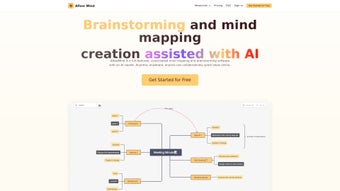
In today’s fast‑paced work environment, turning a scattered brainstorm into a clear, actionable plan can feel like a mountain to climb. AflowMind answers that challenge by marrying the intuitive visual power of mind maps with cutting‑edge artificial intelligence. The platform automatically extracts key concepts from plain text, documents, or simple prompts and arranges them into hierarchical nodes that are instantly editable, shareable, and ready for collaboration.
Whether you’re a solo founder sketching a product roadmap, an educator designing a curriculum, or a corporate team aligning on quarterly objectives, AflowMind provides a secure, cloud‑based canvas that eliminates manual formatting, accelerates idea synthesis, and keeps every stakeholder on the same page. Its responsive web design works on any modern browser, while upcoming native desktop clients promise offline capabilities for Windows and macOS. With a generous free tier and scalable paid plans, AflowMind is positioned as the go‑to AI‑enhanced mind‑mapping solution for individuals and teams that value speed, security, and seamless teamwork.
Overview & Core Capabilities
AflowMind is built around a sophisticated natural‑language engine that interprets user input and generates a fully‑structured mind map in seconds. Users can start with a single keyword, paste a paragraph, or upload a document (DOCX, PDF, TXT) and watch the AI automatically group related ideas, create parent‑child relationships, and label each node with concise, meaningful titles. The platform’s dynamic canvas supports real‑time collaboration: multiple participants can edit the same map, see each other’s cursors, and leave comments without the need for version control.
Integrated to‑do management lets you convert any node into a task, assign due dates, and track progress directly on the map, bridging the gap between ideation and execution. Rich labeling options—including color‑coded tags, hyperlinks, and file attachments—ensure that every piece of information is accessible at a glance. Export flexibility is another strong point: maps can be saved as PNG, PDF, SVG, OPML, or even proprietary Mind‑Manager formats, making it easy to incorporate visualizations into presentations, reports, or other knowledge‑base tools.
Security is baked in, with end‑to‑end encryption, optional two‑factor authentication, and compliance with GDPR and SOC‑2 standards, giving peace of mind to enterprises handling sensitive data.
The AI‑driven workflow dramatically reduces the time spent on manual structuring. Where a traditional mind‑mapping tool might require hours of dragging, linking, and labeling, AflowMind delivers a polished draft in under a minute. From there, users fine‑tune the layout, add custom themes, or expand branches using the “AI Assist” feature, which suggests additional nodes based on context. This blend of automation and human control makes the platform suitable for both quick brainstorming sessions and deep strategic planning. The cloud‑first architecture guarantees that every change is saved instantly, eliminating the risk of data loss and ensuring that collaborators always see the latest version, regardless of device or location.
Installation, Setup & First‑Run Guide
Getting started with AflowMind is intentionally frictionless, thanks to its web‑based nature. There is no heavy installer, no background services, and no compatibility headaches—simply a modern browser and an internet connection. Follow these detailed steps to launch your first AI‑generated mind map:
- Navigate to the Official Site: Open Chrome, Firefox, Edge, or Safari and go to www.aflowmind.com. The homepage greets you with a clean banner and a “Start Free Trial” button.
- Create Your Account: Click “Sign Up,” provide a valid email address, and choose a strong password. Verify the account via the confirmation email, or use Google/Microsoft OAuth for instant access.
- Select a Subscription: Choose the free tier for limited AI generations or pick the Pro plan (USD 9.99 / month) to unlock unlimited maps, advanced export formats, and priority support. A 14‑day trial of the Pro tier is available without entering payment details.
- Enter the Dashboard: After logging in, you land on a personalized dashboard showing recent maps, a “New Map” button, and quick links to tutorials.
- Generate Your First Map: Click “New Map” and pick an input method:
- Prompt: Type a concise phrase such as “digital marketing funnel” and hit “Generate.”
- Upload: Drag a .docx, .pdf, or .txt file into the upload zone; the AI parses the content and builds a map.
- Copy‑Paste: Paste raw text directly into the input field for immediate processing.
- Refine & Customize: Use the left‑hand toolbar to change node colors, add icons, attach files, or convert nodes into tasks. The “AI Assist” button can suggest additional branches or provide a concise summary for any selected segment.
- Collaborate in Real Time: Click “Share,” generate a shareable link, or invite teammates by email. Assign permissions (view, comment, edit) to control access.
- Save & Export: All changes are auto‑saved to your cloud workspace. When finished, select “File → Export” and choose the desired format (PNG, PDF, SVG, OPML, etc.).
- Mobile Access: Open the same URL on Android or iOS browsers; the responsive layout adapts to smaller screens. A dedicated native mobile app is slated for release in late 2025.
If you encounter any obstacles, the Help Center offers step‑by‑step video guides, and Pro subscribers benefit from 24/7 live chat support. The onboarding experience is deliberately streamlined so that users can focus on idea generation rather than software configuration.
Compatibility, Pricing & System Requirements
AflowMind’s cloud‑first architecture means it runs on any modern operating system that supports an up‑to‑date web browser. Officially supported environments include:
- Windows 10/11 – Chrome, Edge, Firefox
- macOS 12 Monterey and later – Safari, Chrome, Firefox
- Linux distributions with recent Chromium‑based browsers
- Android 9+ – Chrome mobile
- iOS 13+ – Safari, Chrome
The client‑side resource demand is minimal; a modest CPU, 2 GB RAM, and a stable internet connection (≥2 Mbps) are sufficient for smooth AI generation and real‑time collaboration. Because processing occurs on AflowMind’s AWS backend, users experience fast response times without taxing their local hardware.
Pricing is transparent and tiered to fit a range of needs:
- Free Plan: Up to 5 AI‑generated maps per month, basic export (PNG, PDF), community forum support.
- Pro Plan (USD 9.99 / month or USD 99 / year): Unlimited AI generations, advanced export (SVG, OPML, Mind‑Manager), priority email & chat support, custom branding, and early access to upcoming desktop clients.
- Team Plan (USD 24.99 / user / month): All Pro features plus centralized admin console, SSO integration, audit logs, API access for workflow automation, and volume discounts for larger teams.
All paid plans include a 14‑day free trial with full feature access. Payments are processed securely via Stripe, complying with PCI‑DSS standards. Refunds are available within the first 30 days of subscription activation.
Pros, Cons, Frequently Asked Questions & Conclusion
Pros
- AI instantly creates structured mind maps from minimal input.
- Real‑time collaboration eliminates the need for separate brainstorming sessions.
- Cross‑platform web app removes installation hassles and works on any device.
- Rich export options and API integrations support diverse workflows.
- Secure cloud storage with optional 2FA protects sensitive ideas.
- Integrated to‑do list turns concepts into actionable tasks.
- Custom themes and templates allow brand‑consistent visualizations.
- Scalable pricing accommodates freelancers to large enterprises.
Cons
- Full feature set requires a paid subscription.
- Offline access is unavailable until native desktop apps launch.
- Heavy reliance on internet connectivity may affect users with unstable networks.
- AI generation limits on the free tier can be restrictive for power users.
Frequently Asked Questions
Can I use AflowMind on a mobile device?
Yes. The web app is fully responsive and works on Android and iOS browsers. A native mobile app is planned for release in late 2025.
Is my data encrypted?
All maps are stored encrypted at rest on AWS servers, and data transmission uses TLS 1.3. You can also enable two‑factor authentication for added security.
What happens to my maps if I cancel my subscription?
Your existing maps remain accessible in read‑only mode. Export them before the subscription ends if you need full editing capabilities.
Can I integrate AflowMind with my existing project management tools?
Yes. Through Zapier, Slack, and Microsoft Teams connectors, you can push tasks from mind‑map nodes directly into Asana, Trello, or Jira.
Is there a free trial for the Pro plan?
A 14‑day free trial is available for all paid tiers, giving you unlimited AI generations and access to premium features without entering payment details.
Overall Verdict: AflowMind bridges the gap between creative brainstorming and actionable planning by leveraging AI to automate the most tedious parts of mind mapping. Its collaborative focus and secure cloud infrastructure make it a solid choice for teams of all sizes. While the free tier is generous for occasional use, power users will find the Pro subscription worth the investment for unlimited maps, advanced exports, and future offline desktop capabilities.
Conclusion & Call to Action
If you’re seeking a fast, secure, and AI‑enhanced way to capture ideas and turn them into organized strategies, AflowMind is ready to streamline your workflow. Start your 14‑day free trial today, explore the AI‑generated mind‑mapping features, and experience how collaborative visual thinking can boost productivity across your projects. Download AflowMind now and watch your ideas evolve from sketches to structured action plans in seconds.



.png)



